The 'Grid and Gantt' view shows the outline view of the WBS and the Gantt chart side-by-side.
To view the schedule in the grid and Gantt view
- Ensure that you are on the project schedule module. If not done already:
- Click the main menu on the top-left
- Click 'Schedule' under 'Scheduler'.
- Click 'Grid' on the left if you are on another screen and click the
 icon above the table to open the 'Grid + Gantt' view
An example is shown below:
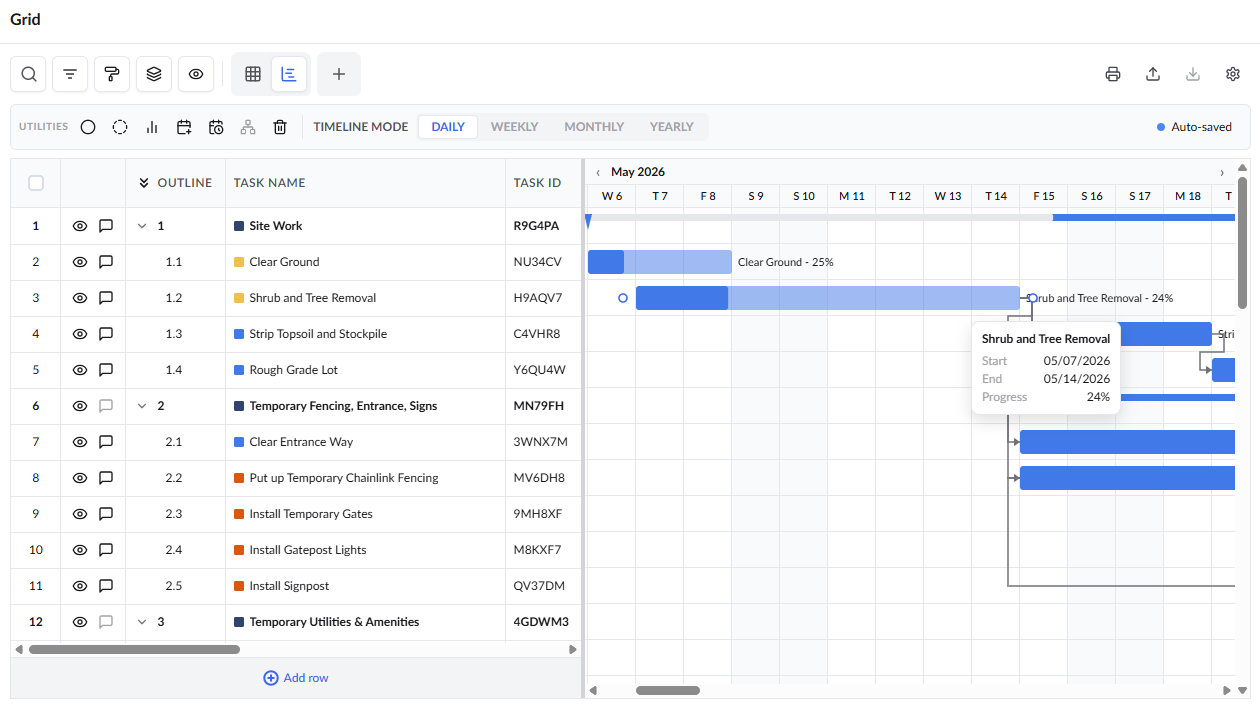
See the previous section Grid View for descriptions of the filters and columns in the table.
- Use the timeline selector at the top to choose, Month/Dialy, Month/Week, Qtr/Month, Year/Month:
Daily: Displays months along the top and breaks them down into individual days for detailed scheduling.
Weekly: Shows each month divided into weeks, helping you track progress on a weekly basis.
Monthly: Groups the timeline by months for a broader planning view.
Yearly: Organizes the schedule by year, with each year broken down into months for a high-level overview.
The Gantt chart also allows you to set and modify the start and end dates of the items by simple drag-and-drop actions.
- You can also set the start and end dates for tasks in the Gantt view. Just drag and drop the bar representing an item near the required date range and drag the left and right edges of the bar to particular dates as required.
- You can directly modify the dates only for last-level child tasks, that is, the items that do not have any children. The dates for the parent tasks adjust automatically, depending on the change in the children's tasks.
- The start and end dates are shifted for the dependent tasks based on changes in the predecessor tasks and their dependency relationship.
- You cannot modify dates for published tasks. See Reschedule Specific Tasks for more details.
See Create Schedule Status Line to know more about schedule status in grid & Gantt view.
Search, Filter, and Sorting Options
- Click the magnifier icon and use the 'Search' box located at the top left to find an entry using any value from the table as search criteria
- Click any column header to sort the rows in ascending or descending order based on that column's data.
- Click the cog wheel icon at the top right to adjust the display density and customize the display and order of the columns. See Customize Columns in List Views.
- The options at the top left allow you to filter the entries, create nested groups of entries, highlight cells and manage personalized and customized views of the table. Use the links below to learn more:
Was this article helpful?
That’s Great!
Thank you for your feedback
Sorry! We couldn't be helpful
Thank you for your feedback
Feedback sent
We appreciate your effort and will try to fix the article