The 'All Task' screen shows the list of all assigned field tasks to the foreman. The list dynamically updates with the changes in the field schedule as enforced by the project manager. Once published by the PM, you can add crew members and equipment requirements for each task. In the course of the execution of the work, you can update the progress of each task and track them till completion. You can also add attachments, like photos of the task progress, for inclusion in the daily reports. The task progress and statistical information like labor and equipment resource consumption, are automatically fetched for daily reports and job cost data calculations.
To view the task details:
- Open the Field Task module of the desired project. The 'All Task' screen opens by default with the list of tasks published for execution.
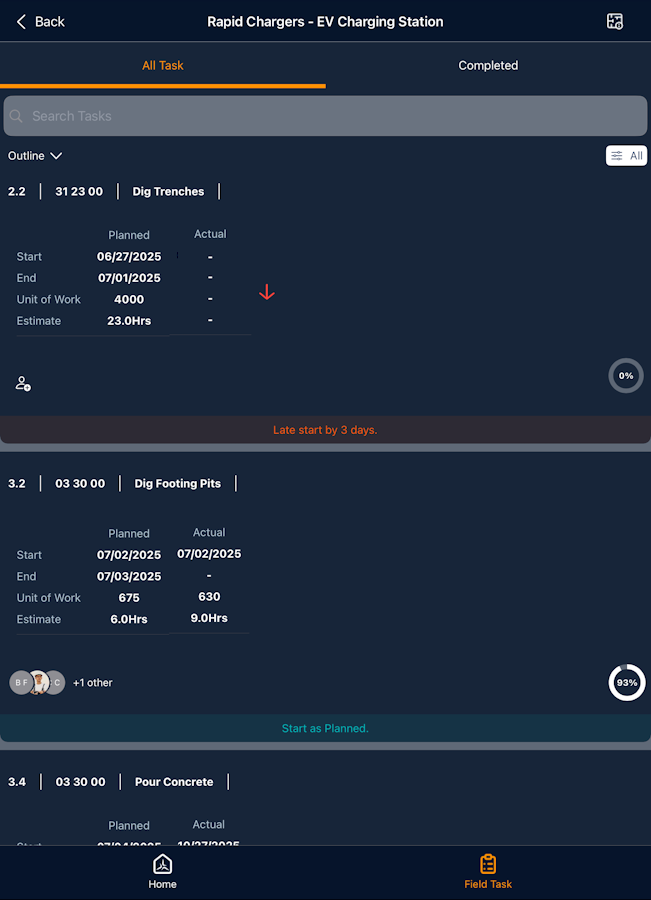
- Tap a title of the card to open the details screen
The Task details screen shows the following details:
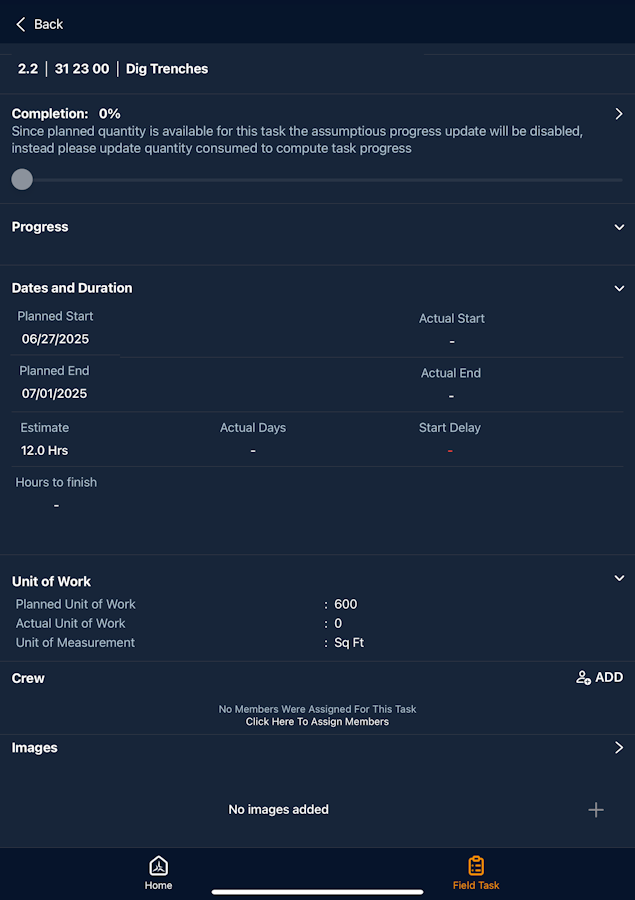
- WBS - The work breakdown structure (WBS) code of the task
- Task Code - The cost code associated with the item.
- Task name - The short description of the task with its progress status.
- Completion % - The current progress percentage of the task.
- Progress - Shows completion updates and progress images uploaded during the progress update.
- Dates and Duration
- Planned Start - The scheduled commencement date of the task.
- Planned End - The scheduled completion date of the task.
- Actual Start - The real commencement date of the task item.
- Actual End - Auto-populates once the task reaches 100% completion.
- Estimate - The planned duration (in days) estimated to complete the task.
- Actual Days - The actual number of days taken to complete the task.
- Start Delay - The difference (in days) between the planned start date and the actual start date of the task.
- Hours to Finish -The remaining work hours required to complete the task.
- Unit of Work - The measurable quantity of work to be performed.
- Planned Unit of Work - The target quantity of work planned for the task.
- Actual Unit of Work - The quantity of work completed to date.
- Unit of Measurement - The standard unit used to quantify the task output (e.g., m³, ft, sq.ft, nos.).
- Planned Unit of Work - The target quantity of work planned for the task.
- Crew - The list of workers or team members assigned to execute the task.
- Images - View and upload task-related photos to document work progress, highlight site conditions, or record issues for reference and reporting.
Was this article helpful?
That’s Great!
Thank you for your feedback
Sorry! We couldn't be helpful
Thank you for your feedback
Feedback sent
We appreciate your effort and will try to fix the article