Company Administrators can easily restore the connection between Linarc and Sage Intacct at any time. Because Linarc retains all of your previous account configurations, dimension mappings, and data synchronization rules, reconnecting is a quick process that allows you to resume your financial workflows right where you left off.
- Resuming Synchronization: Once reconnected, Linarc will instantly resume data synchronization based on your previously established 'Source of Truth' settings.
- Backlogged Data: Any project or financial records (such as budgets, or payroll) created in Linarc while the system was disconnected will automatically push to Sage Intacct if your 'Auto Create' and 'Auto Update' toggles were left enabled.
- Manual Catch-up: If your auto-sync options were disabled during the disconnected period, you must import the queued records into the staging platform and sync them manually to ensure your ledgers are up to date.
Note:
Before reconnecting, you have the opportunity to review and update your existing object configurations or account mappings if your Sage Intacct environment has changed during the disconnected period.
Reconnect Sage Intacct
- Ensure you are in the Linarc admin console.
- Click 'Integrations' at the top of your screen and select 'ERP' from the left menu.
- Locate the Sage Intacct card and click 'Connect'
- If prompted, verify your Sage Web Service User and Company ID in the connection form.
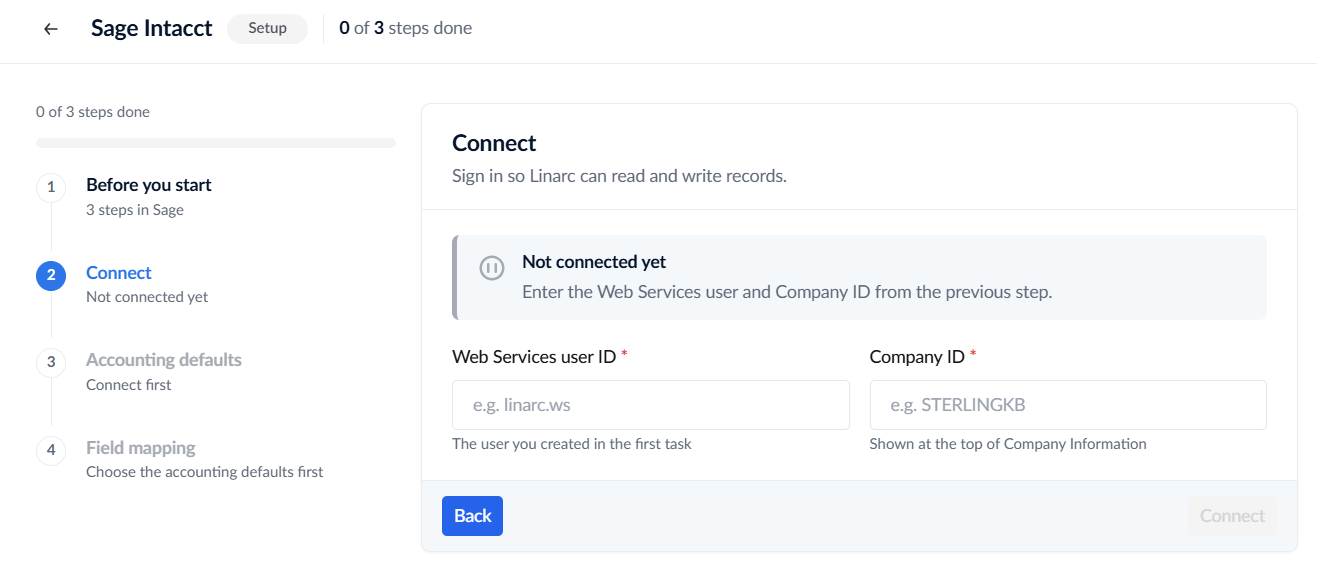
- Click the 'Connect' button.
- Wait for the 'Verified' badge to appear, confirming your integration is successfully restored and active.
See Sage Intacct Integration for more details.
Was this article helpful?
That’s Great!
Thank you for your feedback
Sorry! We couldn't be helpful
Thank you for your feedback
Feedback sent
We appreciate your effort and will try to fix the article