Manage unexpected project delays and keep your team aligned by initiating, reviewing, and publishing master schedule adjustments.
Reschedule initiation:
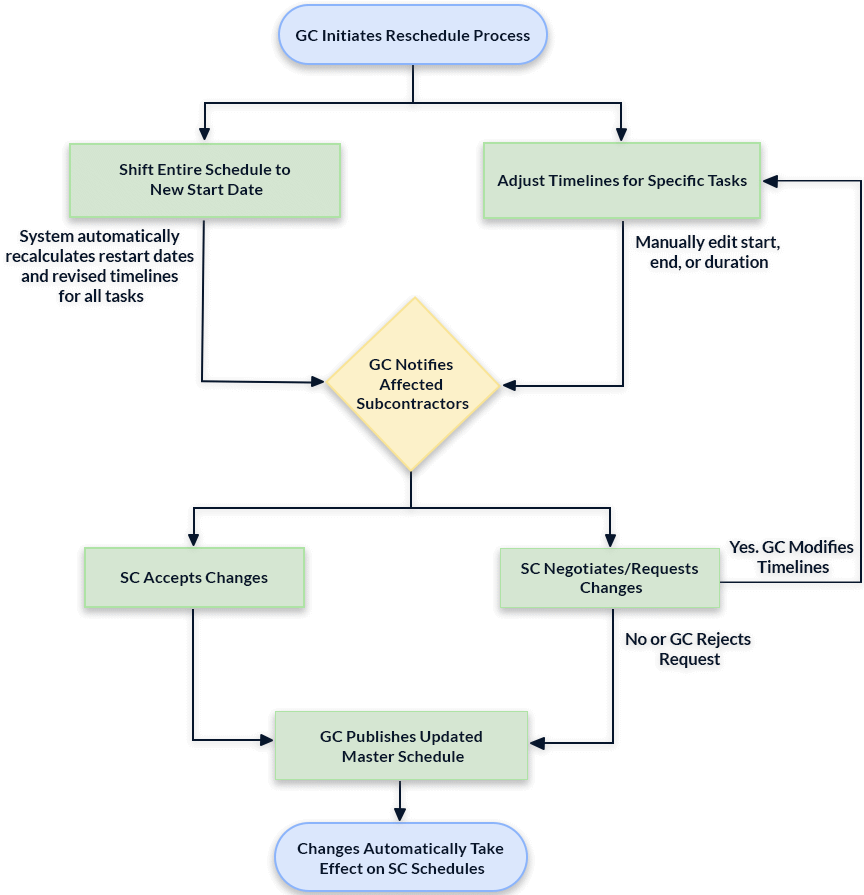
The General Contractor (or a Subcontractor managing their entire project on Linarc) can initiate a reschedule process whenever necessary due to unpredicted delays, weather conditions, resource unavailability, or other factors. There are two primary methods for updating the master schedule depending on the nature of the delay:
1. Shift the Entire Schedule - Set a new date to restart all halted work from where it left off. This process is especially useful if project work was temporarily paused and needs to resume on a specific day.
- Unstarted Tasks: The planned start for all independent, unstarted tasks will automatically align with your chosen day.
- In-Progress Tasks: The system recalculates their new planned end date based on their original planned durations and current completion percentages.
- Dependencies: All dependent task timelines will automatically adjust to match their predecessors' new schedules.
- Manual Overrides: You can remove dependencies and manually override any of these automatically calculated dates as needed.
2. Adjust Timelines of Specific Tasks - Alter the planned timelines of selected tasks by changing their planned start/end dates and duration. This method is helpful if a specific task faces isolated delays due to unpredicted factors like material shortages, weather conditions, or resource unavailability.
- Unstarted Tasks: You can directly modify the start date, the end date, or the total planned days.
- In-Progress Tasks: You can directly update the end date or simply change the remaining duration.
- Dependencies: As you make these changes, all dependent task timelines will automatically shift to follow their newly updated predecessors. System-calculated dates can be manually overridden if needed.
Evaluation Window:
Once initiated, a draft of the new schedule version is created with a set evaluation window (Default = 10 days). The reschedule proposal can be tweaked, edited, and modified at any time within this window prior to being published. If the period lapses without publication, the proposal expires.
Subcontractors Notification:
Once the adjustments are drafted, the GC can optionally communicate the schedule changes to the subcontractors whose work is affected by the reschedule proposal.
Subcontractor Review
The subcontractors can peruse the proposed changes to their work affected by the master schedule updates. They have two options:
- Acceptance: The subcontractor can quickly accept the new changes directly on this screen.
- Negotiation: If they need to negotiate the proposed timelines, they are instructed to reach out to the GC directly.
Publish the Schedule Updates
Once the rescheduling details are finalized and agreed upon, the General Contractor officially publishes the new timeline.
This action instantly updates the master schedule with the newly established task dates. Simultaneously, it pushes the updates to the respective subcontractors' schedules, ensuring the entire project team is perfectly aligned and ready to execute the upcoming work.
Use the links below to navigate to the section you need help with:
Was this article helpful?
That’s Great!
Thank you for your feedback
Sorry! We couldn't be helpful
Thank you for your feedback
Feedback sent
We appreciate your effort and will try to fix the article