The "Huddle Logs" screen offers complete visibility into daily huddles and site meetings held during every shift.
- Each log captures key details, including attendees, meeting duration, and absentees—team members assigned to the shift who failed to attend
- The data is automatically sourced from crew timesheets, either submitted by workers themselves or recorded by foremen, ensuring accuracy and accountability
These logs empower managers to track safety meetings, identify trends, and take proactive measures when meetings deviate from standard protocols, fostering a safer and more efficient work environment
To view the huddle logs
- Click the main menu at the top-left
- Click 'Safety' under 'Field' menu, then select 'Daily Huddles' from the left
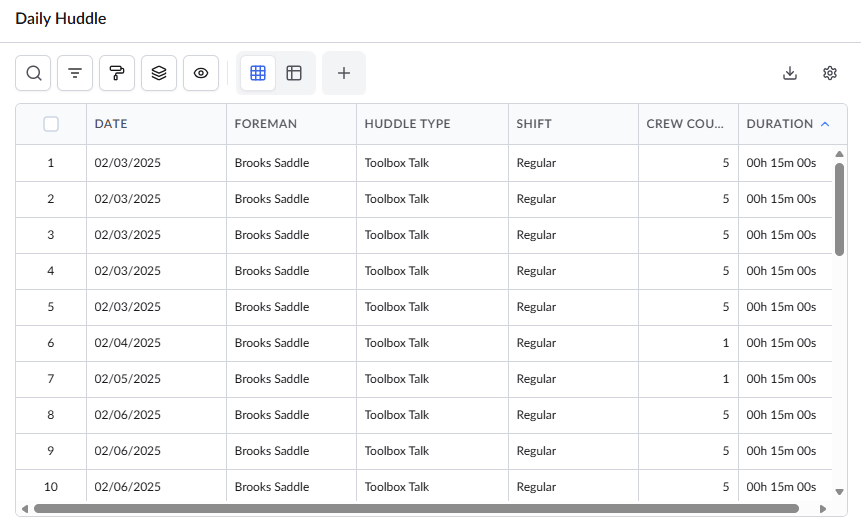
Standard Columns:
- Date – The scheduled date of the meeting.
- Foreman – The shift foreman responsible for conducting the meeting.
- Huddle Type – Specifies the type of the meeting
- Shift – The work shift during which the meeting was held.
- Crew Count – The total number of crew members in attendance.
- Duration – The length of time the meeting lasted.
View Details of a Meeting
- Select an entry to view its details, by clicking on its serial number:
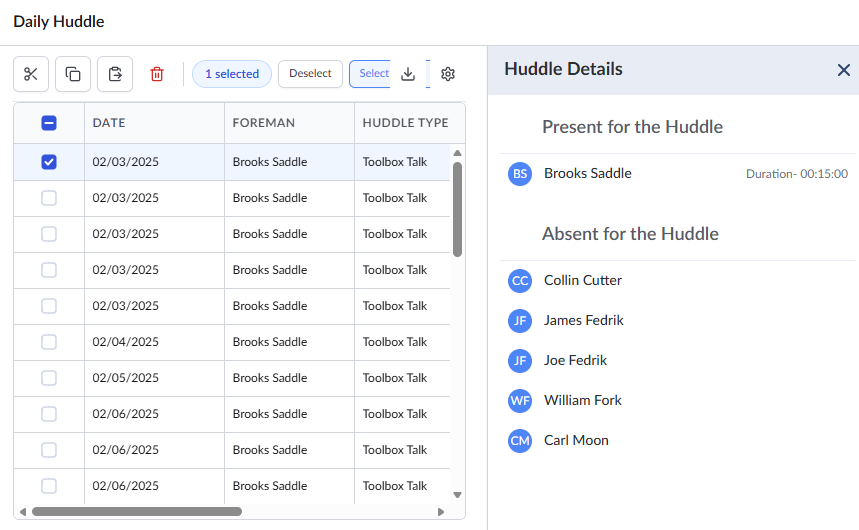
The Details pane opens on the right and displays the following information:
- Present for the Huddle – Crew members who attended the meeting, recorded their attendance, and logged their time spent on their timesheet for the day.
- Absent for the Huddle – Crew members assigned to the shift who either missed the meeting or did not mark their attendance in their timesheet records for the day.
To expand or collapse a section, click the arrow to the left of the section title.
Search, Filter, and Sorting Options
- Click the magnifier icon and use the 'Search' box located at the top left to find an entry using any value from the table as search criteria
- Click any column header to sort the rows in ascending or descending order based on that column's data.
- Click the cog wheel icon at the top right to adjust the display density and customize the display and order of the columns. See Customize Columns in List Views.
- The options at the top left allow you to filter the entries, create nested groups of entries, highlight cells and manage personalized and customized views of the table. Use the links below to learn more:
Was this article helpful?
That’s Great!
Thank you for your feedback
Sorry! We couldn't be helpful
Thank you for your feedback
Feedback sent
We appreciate your effort and will try to fix the article