Company administrators can disconnect the Acumatica integration from Linarc at any time, for example to perform extensive accounting maintenance, move to a different Acumatica tenant, or pause data sync temporarily. You can restore the connection when you are ready to resume.
What happens when you disconnect:
- Data Preservation: Project data created in Linarc while the integration is disconnected, such as budgets, recurring costs, and payroll, stays stored in Linarc.
- Sync Suspension: All automatic and manual sync between Linarc and Acumatica stops while the integration is disconnected. A reminder banner stays on the integration dashboard until you reconnect.
- Post-Reconnection Sync: If 'Auto Create' and 'Auto Update' were on, records created while the integration was disconnected sync automatically after you reconnect. If they were off, those records do not sync automatically.
Disconnect Acumatica
To disconnect Acumatica from Linarc
- Log in to the Linarc Admin Portal.
- Click 'Integrations' at the top and select 'ERP' on the left.
- Click 'Manage' on the 'Acumatica' card.
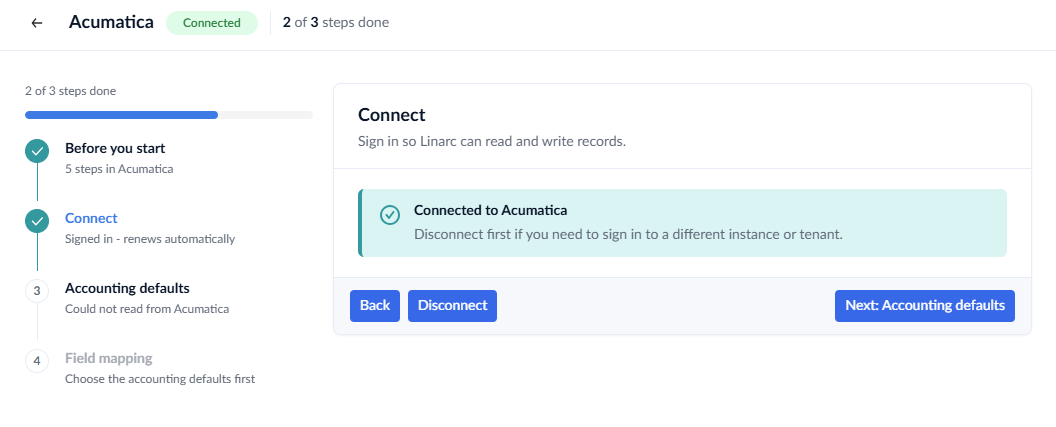
- Click 'Disconnect'.
- Click the confirmation button to confirm.
Synchronization between Linarc and Acumatica is paused. See Reconnect Acumatica with Linarc to restore the connect
Was this article helpful?
That’s Great!
Thank you for your feedback
Sorry! We couldn't be helpful
Thank you for your feedback
Feedback sent
We appreciate your effort and will try to fix the article