To ensure your personnel data stays perfectly aligned, Sage Intacct pushes employee changes to Linarc through a Platform Trigger. This setup tells your accounting software to securely send updates to Linarc whenever an employee record is created or modified. You only need to set this up once per Sage Intacct company.
Pre-requisite: Your Sage Intacct account must have Platform Services subscription.
You can verify this by navigating to Company → Admin → Subscriptions in Sage. If it is not listed there, contact Sage Intacct support to have it enabled.
Required Linarc Configuration Details
Before diving into Sage Intacct, you will need the following to ensure Sage Intacct sends the data securely and in the correct format:
Client ID: Your unique system identifier used to authenticate the connection and securely sign the data deliveries sent from Sage Intacct to Linarc.
Target URL: The exact destination endpoint where Sage Intacct will route your employee creation and update data.
Document Template: A pre-configured file that structures the outgoing Sage data exactly as Linarc expects to read and map it.
You can easily copy the ID and URL, and download the template directly from the Linarc configuration screen
- Open the Sage Intacct 'Setup' screen in Linarc and scroll down and look for "To sync Employees from Sage to Linarc" section
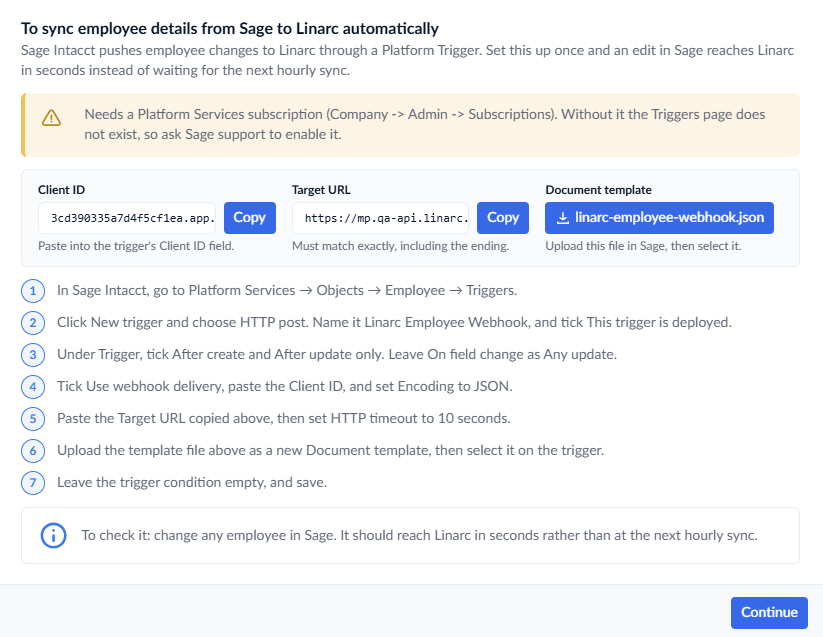
- Click the 'Copy' button and 'Download' button to get the Client ID, Target URL and Document Template during the configuration process.
Step-by-Step Configuration in Sage Intacct
With your Linarc credentials ready, log in to your Sage Intacct administrator account and follow these categorized steps to configure the Platform Trigger. See here for more details on adding platform triggers on sage intacct.
Step 1: Initialize the Trigger
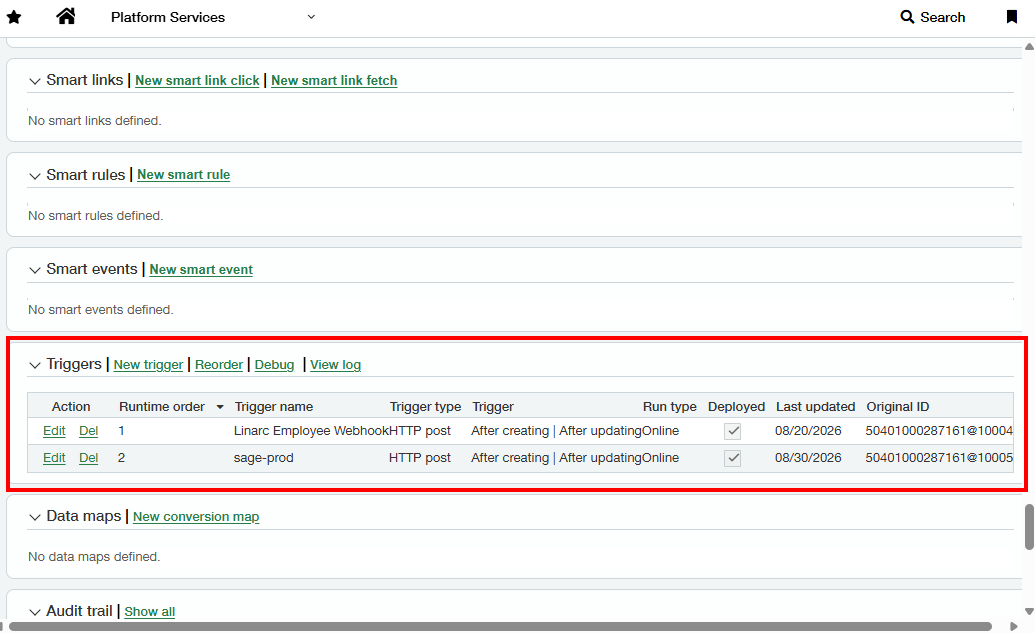
- Open the Employee object's triggers: Navigate to Platform Services → Objects.
- Scroll down and click the Employee object
- Click Triggers at the top of the page and select New trigger.
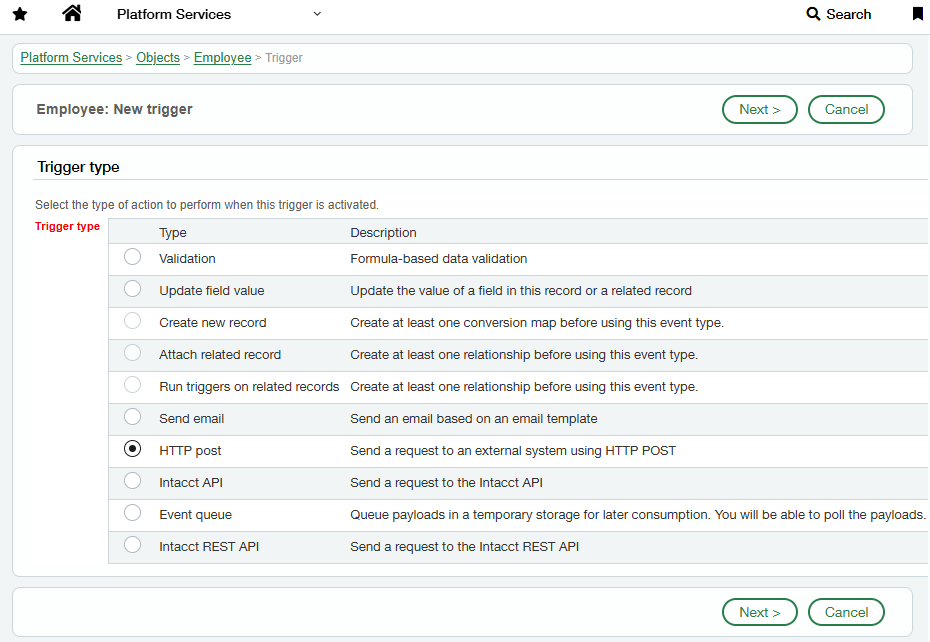
- Select the Trigger type:Select HTTP post, which dictates that Sage will "Send a request to an external system using HTTP POST".
- Click Next.
Step 2: Define Trigger Events and Status
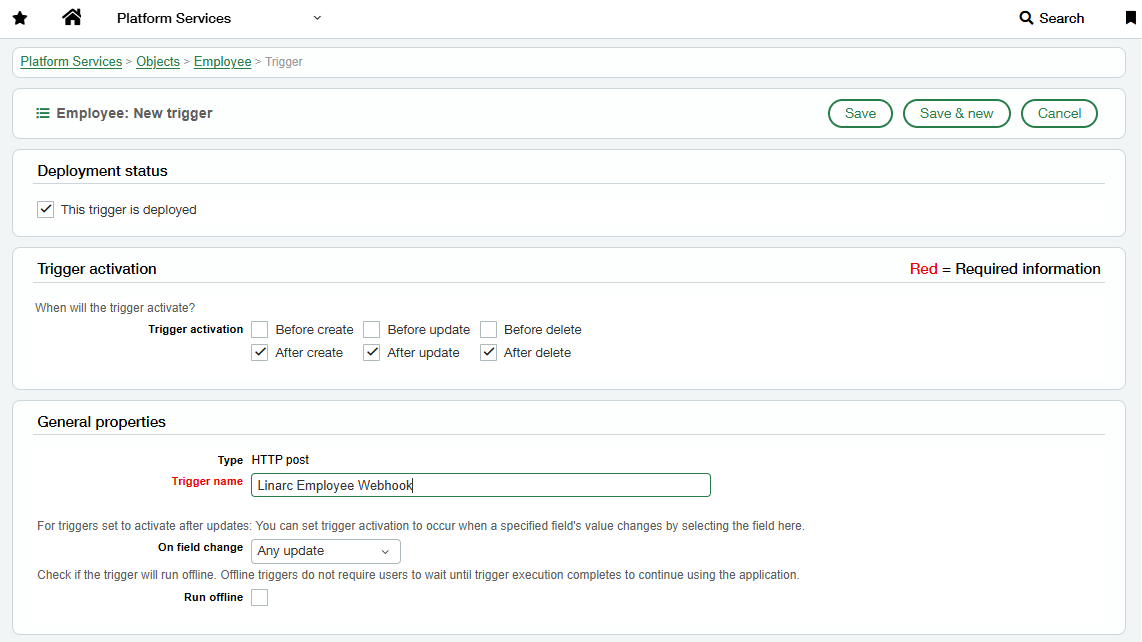
- Confirm Deployment status: Check the box next to This trigger is deployed. (Note: A trigger that is not deployed is saved in the system but will never actually fire)
- Configure General properties:
- Next to the Trigger setting, check the boxes for After create and After update. Leave the "Before" and "delete" options unchecked, as Linarc only handles creation and update events.
- Enter a clear Trigger name, for example: Linarc Employee Webhook.
- Leave the On field change setting as Any update to ensure every employee edit is successfully sent to Linarc.
Step 3: Configure Webhook Delivery and Payload
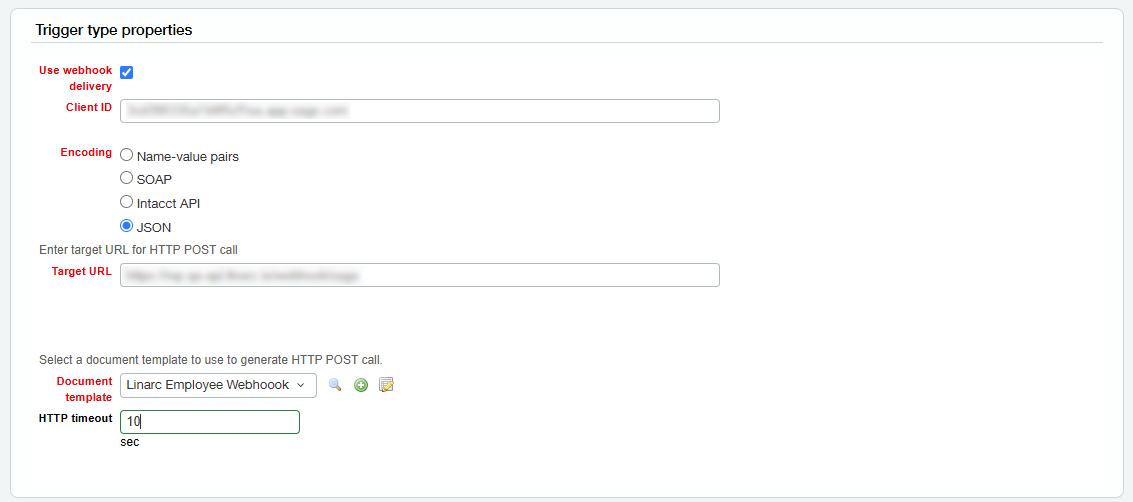
- Set Trigger type properties:
- Check Use webhook delivery. This crucial step ensures Sage signs each delivery so Linarc can securely verify it.
- Paste the Client ID you copied from Linarc earlier into the Client ID field.
- Set the Encoding to JSON.
- Input the Target URL: Paste the Target URL you copied from Linarc into the Target URL field. Ensure it matches exactly, including the /webhook/sage ending.
- Add the Document template:
- Next to Document template, click the + icon to create a new template.
- Name it Linarc Employee Webhook, then open the file you downloaded earlier, paste its contents into this window, and save it.
- Back on the main trigger screen, select your newly created template from the Document template dropdown.
- Set the HTTP timeout field to 10 seconds.
Step 4: Finalize and Activate
- Trigger condition formula: Leave this section empty. This is an optional filter, and anything entered here will stop the trigger from firing unless the formula returns true.
- Save and Activate: Click Save.
Your configuration is complete! Sage Intacct will now automatically notify Linarc whenever an employee record is created or updated.
Was this article helpful?
That’s Great!
Thank you for your feedback
Sorry! We couldn't be helpful
Thank you for your feedback
Feedback sent
We appreciate your effort and will try to fix the article