While the Subcontracts module is primarily used to formalize agreements with external trades, it is equally important to establish a financial baseline for your own internal scope. The system requires you to create and lock a commitment contract for any self-performed work or administrative tasks assigned directly to your company.
Because you act as both the assignor and the assignee for these budget lines, this process bypasses the standard external review workflow. Instead of publishing the contract for approval, you simply pull your self-assigned budget lines into an internal commitment, finalize the list, and manually lock it.
Prerequisite: Before setting up this internal commitment, ensure that the relevant budget line items for self-performed work have been committed to your own company within the master budget.
To set up commitment for self-performed work
- Open the Commitment Contract screen. To do so, click the main menu at the top-left and select 'Subcontracts' under 'Finance'
- Select 'My Commitment' on the left
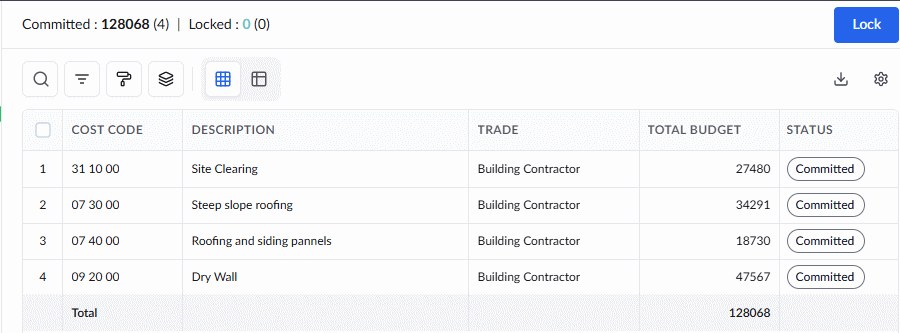
The screen displays a list of the budget items that have been self-assigned to your company and committed from the master budget. If you need to adjust your internal commitment on the fly, you can easily remove items from this list before locking:
- Select the budget items you want to remove by clicking the serial numbers
- Click the trashcan icon at the top
Lock the Self Commitment
Unlike external subcontracts, your self-performed contract does not require publishing for review and can be locked immediately.
- Once you have finalized your list of internal budget lines, click the Lock button to secure your commitment.
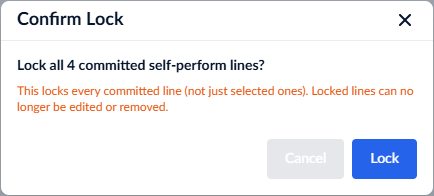
- Click 'Lock' again in the confirmation dialog to verify.
The locked internal commitment now serves as the definitive financial baseline for the self-assigned work within your overarching project budget.
Next Steps:
- Create Your SOV: With your internal commitment locked and your financial baseline established, you can now use these locked lines to construct your detailed budget and internal Schedule of Values (SOV).
Was this article helpful?
That’s Great!
Thank you for your feedback
Sorry! We couldn't be helpful
Thank you for your feedback
Feedback sent
We appreciate your effort and will try to fix the article