Linarc empowers general contractors to curate a company-level library of schedule templates tailored to the full diversity of projects they handle. Turn successful existing schedules into reusable project delivery plans to standardize proven best practices across commercial, residential, and specialized builds—all while retaining the flexibility to adjust tasks, timelines, and dependencies to fit every new job.
Transform any existing project into a reusable schedule template in just a few clicks.
Automatically preserve your entire task hierarchy, critical dependencies, and all essential parameters.
Import saved templates as a proven foundation for future projects of a similar scope and scale.
Instantly generate a foundation schedule by setting a new project start date and duration.
To save a schedule as a template
Open the Master Schedule of an already existing equivalent project
Click the 'Save as Template'
 icon on the top right
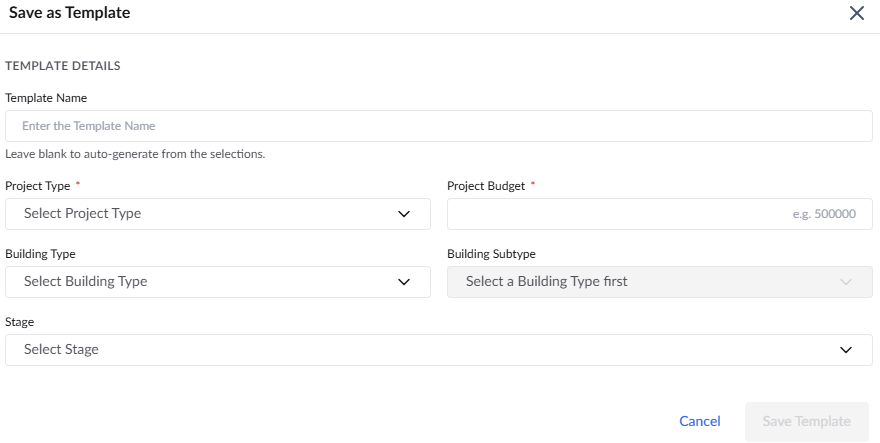
- Enter the following details:
Template Name - A label to identify the project in the Linarc platform.
Project Type - The category or primary classification of the project, defining the overall scope or sector. Select the desired category from the drop down.
Project Budget -
Building Type - The classification of the building based on its occupancy and use, whether it is residential, commercial, educational, etc.
Building Subtype - The subclassification of the building depending on its occupancy and use.
Stage -The project's progress status. Choose the stage from the dropdown.
Click 'Save Template' to proceed
Your new template is added to your library—ready to be imported. Linarc automatically preserves your entire task hierarchy, critical dependencies, and all essential parameters.
Was this article helpful?
That’s Great!
Thank you for your feedback
Sorry! We couldn't be helpful
Thank you for your feedback
Feedback sent
We appreciate your effort and will try to fix the article