The Crew Timecard app monitors crew location in real-time to ensure accurate timesheets. It automatically clocks out crew members who leave the site geofence and remain away beyond a certain period. This is primarily useful for crew members who forget to clock out manually at the end of their shift. To prevent data errors caused by GPS drift or brief errands, the system utilizes a configurable time threshold that acts as a grace period for exits.
- The system continues the active clock-in session if a crew member exits the geofence but returns within the defined time limit, effectively ignoring temporary signal drops or brief exits.
- If a crew member remains outside the geofence beyond the set threshold, the system interprets this as the end of the shift and automatically clocks them out.
- If a worker is auto-clocked out but returns to the site to continue working (e.g., after a long lunch break), they must manually clock in again to begin a new time entry.
- The timecard app provides a default five-minute grace period in addition to the set threshold
To set up the auto-clockout threshold
- Ensure you're on the 'Site Setup' screen. If not:
- Click the main menu at the top-left
- Click 'Jobsite' under 'Field' menu
- Click 'Site' on the top, then choose 'Setup' on the left
You can set up the auto-clockout threshold in the 'Site Address' pane on the right:
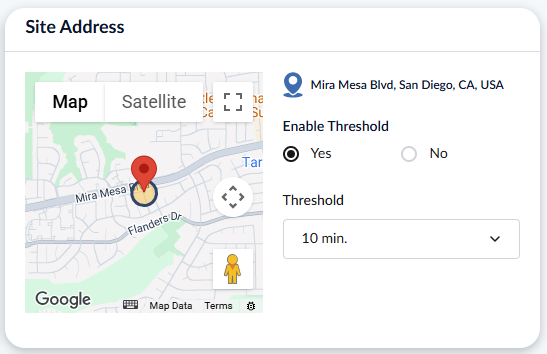
- Click 'Yes' under 'Enable Threshold'
- Click the dropdown under threshold and select the threshold limit
Changes are auto-saved and can be updated at any time.
Was this article helpful?
That’s Great!
Thank you for your feedback
Sorry! We couldn't be helpful
Thank you for your feedback
Feedback sent
We appreciate your effort and will try to fix the article