The owner can access the change orders (COs) submitted for approval through the project management console. You can review the details, assess the impact on cost, scope, or timeline, and decide whether to approve or reject the CO.
Approving a change order:
Confirms your agreement with the proposed changes.
Strengthens collaboration and accountability across the project team.
Helps keep the project aligned with contractual obligations and overall objectives.
To finalize the change order
- Open the change order if you haven't done so. To open:
- Click the main menu at the top-left
- Click 'Change orders' under 'Financials & Controls'
- Click 'Boards' on the left
- Click the change order from the 'Bids Closed' column
- Click the 'CO Value' tab
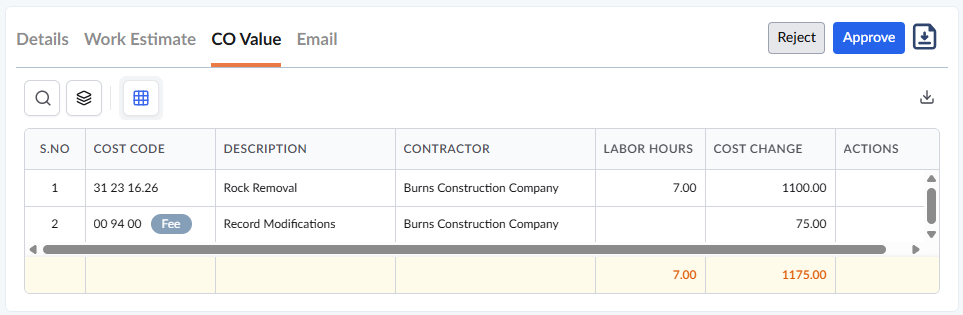
- Click 'Approve' to approve the change order on behalf of the owner
- Click 'Reject' to cancel the change order
Once approved/rejected, the CO gets closed and moves to the 'Final Approval' status. You can also download a PDF version of the closed change order:
- Click 'Completed' on the left to see the list of all closed change orders
- Click the
 icon to save a copy of the CO Value in Excel format on your device or in the project repository for record-keeping and sharing. See Download List Views and Logs in Excel Format to learn more
The approved CO is now available to add to the master schedule of the project. The values like costs, schedule and cost impacts, the subcontractor to whom the work is assigned, etc., are automatically imported to the schedule item from the change order. See Add a change order to the schedule for guidance on this.
Once added to the schedule, the cost of the approved change order work adds to the project budget. You can view the change orders added to the budget in the 'Finance' > 'Budget' > 'Change Order' screen. See View Budget Updates for more details.
Was this article helpful?
That’s Great!
Thank you for your feedback
Sorry! We couldn't be helpful
Thank you for your feedback
Feedback sent
We appreciate your effort and will try to fix the article