The scheduler allows project managers to grab a snapshot of the project schedule at any time and save it as a schedule baseline revision. Each baseline revision is numbered sequentially.
- General contractors create baseline versions of the project's master schedule, that includes all tasks assigned to different contractors, at that point in time.
- Subcontractors can create baseline revisions for their own contractor schedule with the tasks that they created as subtasks to those received from the general contractor.
- Once created, you can assign a color to the baseline version to indicate it in the Gantt chart in the comparison view.
Best Practice:
- Create a schedule baseline immediately before initiating a reschedule and another after the updated dates are published.
- This preserves the original timeline and enables easy comparison to track how the reschedule impacted the overall project schedule
To create a schedule baseline
- Ensure that you are in the grid view of the 'Schedule' module. If not,
- Click the main menu at the top-left
- Click 'Schedule' under 'Scheduler'
- Select 'grid' from the left
- Click the 'Baseline' icon
 on the top.
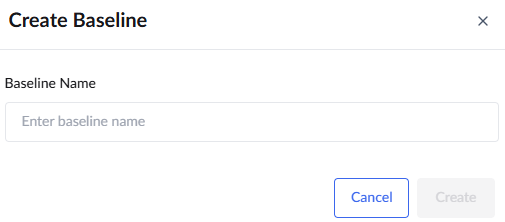 Enter a label for the baseline version. The name will be prefixed with 'Baseline_date_stamp'.
- Click 'Create.'
The scheduler saves the snapshot of the current schedule as a baseline version. You can view the baseline version in the 'Baselines' screen.
- Click 'Baseline Summary' from the left menu.
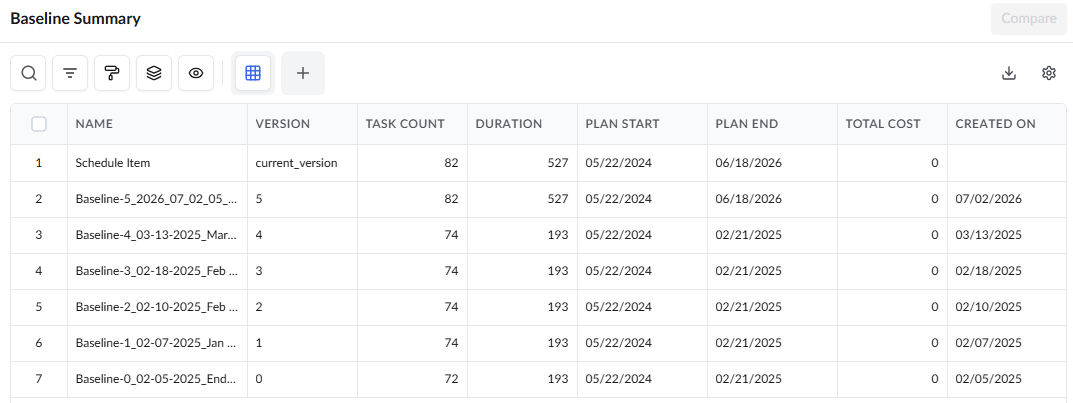
The newly created baseline is listed next to the current version (that is, serial number 2. The version is now ready to be compared with any other previous versions or the current schedule version. See View and Compare Baselines for more details.
Was this article helpful?
That’s Great!
Thank you for your feedback
Sorry! We couldn't be helpful
Thank you for your feedback
Feedback sent
We appreciate your effort and will try to fix the article