Company Administrators can disconnect the QuickBooks Desktop (QBD) integration from Linarc at any time. This function is useful if you need to perform extensive accounting maintenance, switch company files, or temporarily pause data synchronization. You can easily reconnect the integration whenever you are ready to resume.
- Data Preservation: Project data created in Linarc during the disconnected period—such as budgets, invoices, recurring costs, and payroll—remains safely stored in the platform.
- Sync Suspension: All automatic and manual synchronization between Linarc and QBD is paused while the integration is disconnected. Any scheduled Web Connector polls during this period will be rejected.
- Post-Reconnection Sync: Records created while the integration was disconnected will automatically sync during subsequent Web Connector polls if 'Auto-Create' and 'Auto-Update' options are enabled. If these options are disabled, users can push the records manually through the staging platform.
Note:
- All previously configured integration settings and account mappings are retained when disconnecting and reconnecting.
- You can review and update existing object configurations at before resuming synchronization.
Disconnect QBD
- Ensure you are logged in to the Linarc Admin Portal.
- Click 'Integrations' at the top menu and select 'ERP' from the left navigation pane.
- Click 'Manage' on the 'QuickBooks Desktop' card.
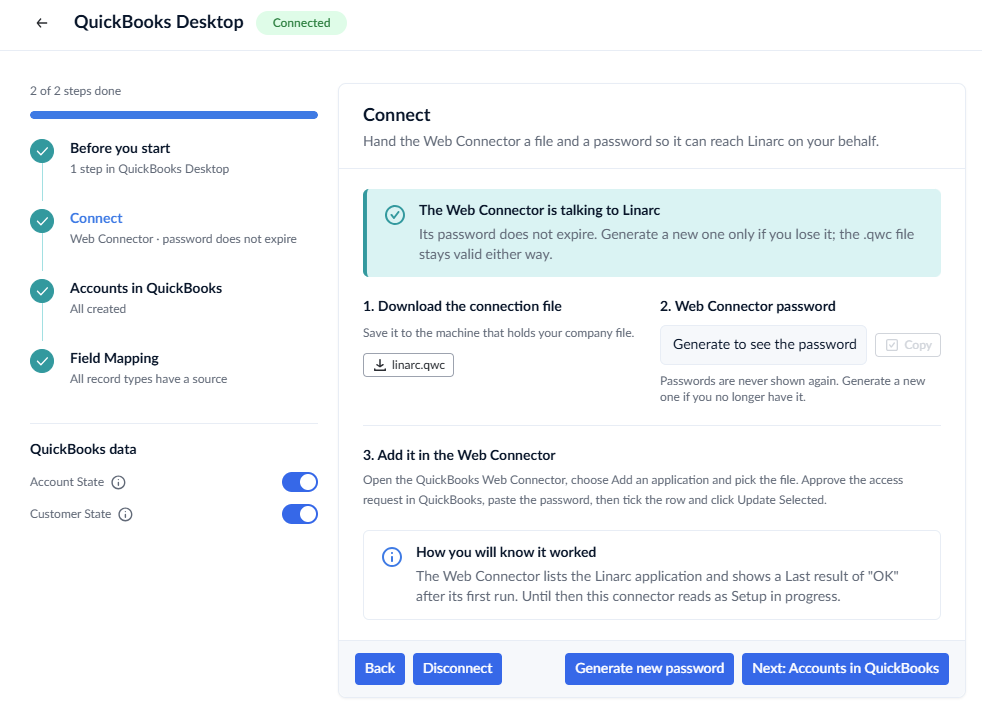
- Click 'Disconnect QBD'
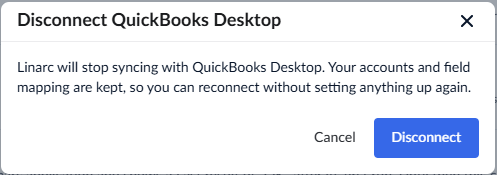
- Click 'Confirm' to pause synchronization.
See Reconnect QuickBooks Desktop with Linarc to integrate your QBD with Linarc again.
Was this article helpful?
That’s Great!
Thank you for your feedback
Sorry! We couldn't be helpful
Thank you for your feedback
Feedback sent
We appreciate your effort and will try to fix the article